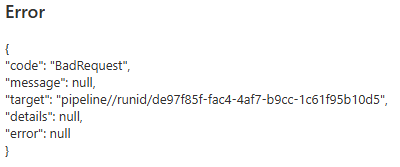
I recently had a new pipeline fail. It was actually a copy of an old pipeline where I had made some adjustments into as part of a database migration. When triggered during an execution run, it failed saying some expression could not be parsed. When I went into the pipeline and triggered a debug, it immediately failed with the following helpful error message:
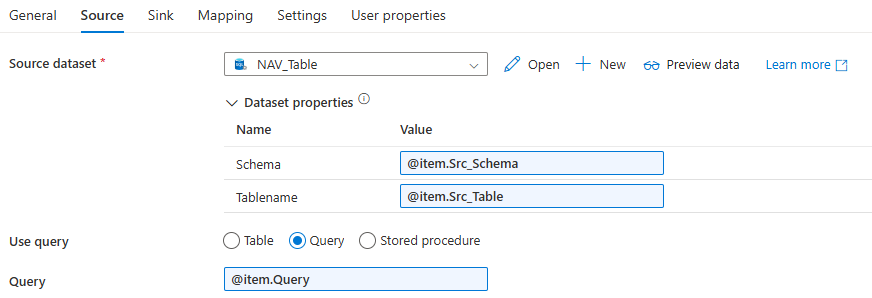
Right. Not the same error from the monitoring pane. I went into a copy data activity, and found the following expressions:
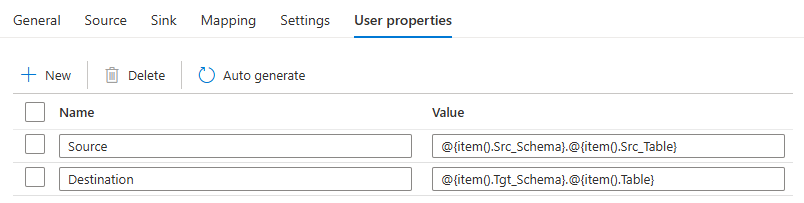
The parsing error was from the expression @item.Query. I changed this to @item().Query, but the debug still failed with the Bad Request error. Strangely enough, validating the pipeline doesn’t result in an error. After searching the web, I found that the Bad Request error pops up when something isn’t configured correctly in the pipeline. A space in a name where it doesn’t belong, an unused variable etc. After some digging around, I found that there were some user properties in the Copy Data activity that referenced some activities that I had removed earlier. I fixed their expressions to reference existing items:
Personally I’ve never used the user properties before. They seem to be quite useful though, as explained in this blog post by Cathrine Wilhelmsen.
Anyway, once I fixed the properties the pipeline ran without an issue. I would have been nice though if the error was a bit more clear (for example, expression X contains a reference that cannot be resolved), or that at least the validation of the pipeline would fail.
You can find the slides and SQL scripts for my session "Spice up your SQL…
The slides for my session "The €100 data warehouse on the Azure data platform" can…
A good week ago I hosted the monthly T-SQL Tuesday blog party. I invited the…
It's the second tuesday of the month, which means T-SQL Tuesday time! This month's topic…
It's time for T-SQL Tuesday again! And we're almost to number 200! T-SQL Tuesday is…
A while ago we suddenly had an error while trying to deploy one Fabric workspace…