Quite the title, so let me set the stage first. You have an Azure Data Factory instance (or Azure Synapse Pipelines) and you have a couple of linked services that point to Fabric artifacts such as a lakehouse or a warehouse. You want to deploy your ADF instance with an Azure Devops build/release pipeline to another environment (e.g. acceptance or production) and this means the linked services need to change as well because in those environments the lakehouse or warehouse are in a different workspace (and also have different object Ids).
When you want to deploy ADF, you typically use the ARM template that ADF automatically creates when you publish (when your instance is linked with a git repo). More information about this setup can be found in the documentation. To parameterize certain properties of a linked service, you can use custom parameterization of the ARM template. Anyway, long story short, I tried to parameterize the properties of the Fabric linked service. When you look at the JSON of such a linked service, it looks like this:
{
    "name": "my_fabric_lakehouse_linkedservice",
    "type": "Microsoft.DataFactory/factories/linkedservices",
    "properties": {
        "type": "Lakehouse",
        "typeProperties": {
            "workspaceId": "someId",
            "artifactId": "anotherId",
            "tenant": "yetAnotherId",
            "servicePrincipalId": "moreId",
            "servicePrincipalCredentialType": "ServicePrincipalKey",
            "servicePrincipalCredential": {
                "type": "AzureKeyVaultSecret",
                "store": {
                    "referenceName": "my_keyvault",
                    "type": "LinkedServiceReference"
                },
                "secretName": "service-principal-secret"
            }
        },
        "annotations": []
    }
}
In this case, authentication is done using a service principal and its secret is stored in an Azure Key Vault (for which there’s also a linked service configured). We’re interested in parameterizing the workspaceId, the artifactId and the servicePrincipalId properties. So I added the following piece of JSON to the arm-template-parameters-definition.json file:
    "Microsoft.DataFactory/factories/linkedservices": {
     "*": {
            "properties": {
                "typeProperties": {
                    "workspaceId": "=",
                    "artifactId" : "=",
                    "servicePrincipalId": "="
                }
            }
        }
    }
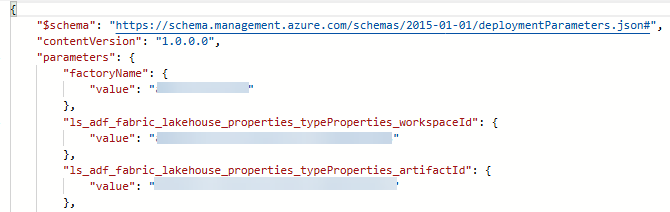
However, none of those properties were added to the ARMTemplateParametersForFactory.json file in the adf_publish branch. Turns out, the actual JSON in ADF uses Microsoft.DataFactory/factories/linkedservices, while the JSON in the custom parameterization needs to use Microsoft.DataFactory/factories/linkedServices (with a capital S). When I made this little change, the properties were finally added to the ARM parameters file and I could overwrite them in the Azure Devops pipeline:
------------------------------------------------
Do you like this blog post? You can thank me by buying me a beer 🙂
