SQLKover update: For some reason, this was my most popular blog post on the old LTD site. Over 110,000 views. People must be building them script components.
The problem
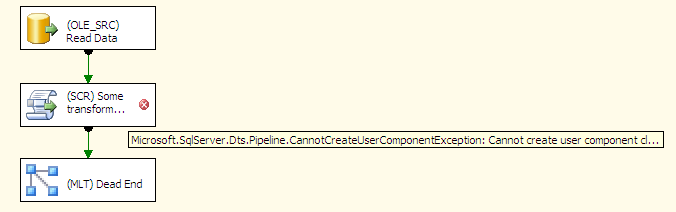
From time to time I have to script out some logic using a Script Component in a SSIS package. Business as usual for most developers, but since I hardly have a .NET background, it’s always a very stressful experience (I may be over exaggerating a bit). Sometimes it happens I write a little piece of code with a small bug, it happens to the best of us.
public override void Input0_ProcessInputRow(InputBuffer row)
{
    byte test = -1; // do something stupid here
    // rest of the code
}
For those who haven’t noticed: you cannot store -1 in a byte. Anyway, the wonderful designer that is the Visual Studio shell fails to warn me of my little indiscretion. Leaving me with a script component that won’t compile.
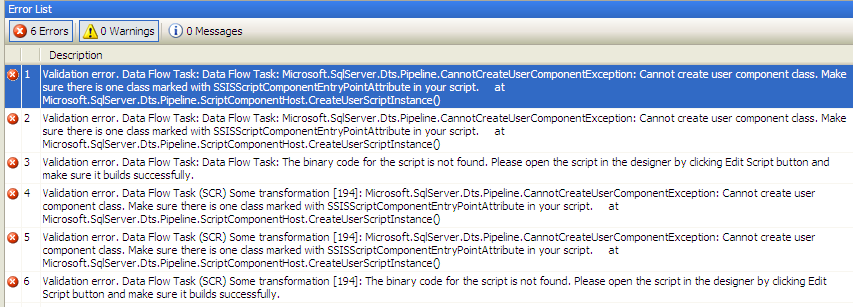
The matching errors aren’t helpful either.
The solution
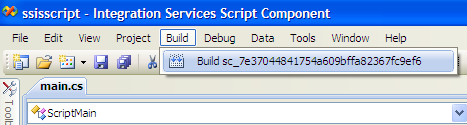
The solution is elegant yet simple: we force the designer to tell us what’s wrong by building the code inside the script component.
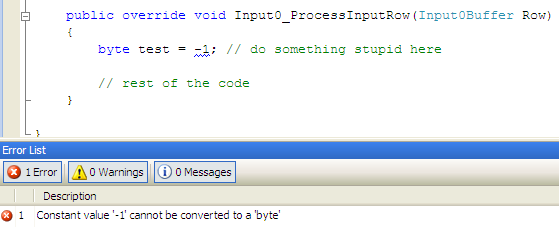
This results in a blue squiggly being added to the code, together with a decent explanation.
The moral of this story: if the script component is giving you a hard time, hit that build button!
The slides for my session "The €100 data warehouse on the Azure data platform" can…
A good week ago I hosted the monthly T-SQL Tuesday blog party. I invited the…
It's the second tuesday of the month, which means T-SQL Tuesday time! This month's topic…
It's time for T-SQL Tuesday again! And we're almost to number 200! T-SQL Tuesday is…
A while ago we suddenly had an error while trying to deploy one Fabric workspace…
I've uploaded the slides for my Techorama session Microsoft Fabric for Dummies and my DataGrillen…