This is a quick blog post, mainly so I have the code available if I need it somewhere in the future 🙂
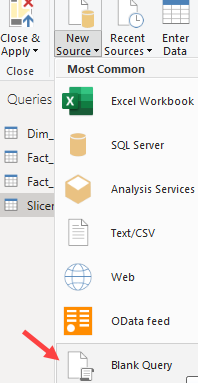
Sometimes you need a numbers table (also called tally table) when you’re working with data. It’s a table with one single integer column that contains incremental numbers (0,1,2,3,4,…). In a database, it’s fairly easy to generate using either cross-joins or a generator function (GENERATE_SERIES in T-SQL). Recently, I needed such a table in Power BI Desktop. Suppose you don’t have a database as a source (or maybe you cannot change the database), so we need to generate this in Power Query. First, add a blank query:
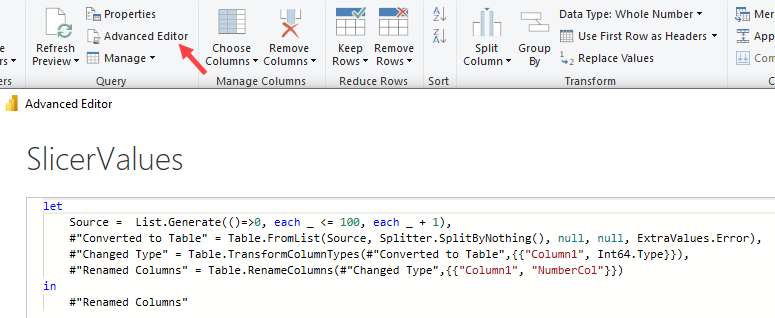
Then you go to the advanced editor, where you paste the following code:
let
    Source =  List.Generate(()=>0, each _ <= 100, each _ + 1),
    #"Converted to Table" = Table.FromList(Source, Splitter.SplitByNothing(), null, null, ExtraValues.Error),
    #"Changed Type" = Table.TransformColumnTypes(#"Converted to Table",{{"Column1", Int64.Type}}),
    #"Renamed Columns" = Table.RenameColumns(#"Changed Type",{{"Column1", "NumberCol"}})
in
    #"Renamed Columns"
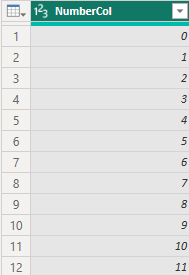
This will generate a table with 101 rows, starting at 0 and ending with 100.
UPDATE:
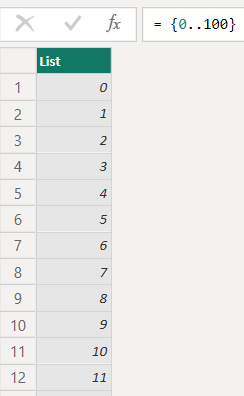
I got this reaction from Alex Powers – a Fabric aficionado from Microsoft – on Bluesky:
This means we can replace the first line of the M code with the elegantly simple {0..100}.
The slides for my session "The €100 data warehouse on the Azure data platform" can…
A good week ago I hosted the monthly T-SQL Tuesday blog party. I invited the…
It's the second tuesday of the month, which means T-SQL Tuesday time! This month's topic…
It's time for T-SQL Tuesday again! And we're almost to number 200! T-SQL Tuesday is…
A while ago we suddenly had an error while trying to deploy one Fabric workspace…
I've uploaded the slides for my Techorama session Microsoft Fabric for Dummies and my DataGrillen…