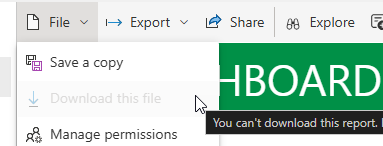
Yes, you’re reading that right, we’re going to download a report that cannot be downloaded. Well, it cannot be downloaded from the user interface, that is. Suppose you have a report in a Power BI workspace (Pro, PPU, Fabric, it shouldn’t matter), and they’ve lost the original Power BI Desktop file. You try to download the report, but for some reason the GUI doesn’t let you:
There are many reasons why a report can’t be downloaded (you don’t have permissions for example), but one reason is that the report has a live connection to a semantic model (or an SSAS model). You can find the full list of limitations in the documentation. There are a couple of work arounds (which might or might not work):
Another method is to use the Fabric CLI. This free command line tool allows you to all sorts of admin stuff in Microsoft Fabric, but also in Power BI. And there’s an export command! Open your command prompt of choice, log into your Fabric/Power BI tenant and navigate to the desired workspace using the fab cd command. Then, try to export the report using the following command:
fab export "my_report.Report" -o "C:\myfolder\" -f
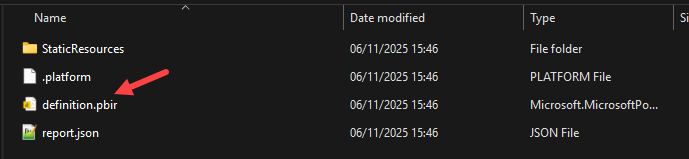
The -o switch specifies the output directory, while the -f switches “forces” the export, but this means that the fab cli tool doesn’t ask “are you sure? Y/N” (which is useful for automation where no user input is available). In my case (your mileage might vary, let me know in the comments), the report was extracted to a folder in the PBIRS format:
There’s no .pbip file, but if you look inside the folder, there’s a definition.pbir file and if you double click that one, it will also open Power BI Desktop.
You can find the slides and SQL scripts for my session "Spice up your SQL…
The slides for my session "The €100 data warehouse on the Azure data platform" can…
A good week ago I hosted the monthly T-SQL Tuesday blog party. I invited the…
It's the second tuesday of the month, which means T-SQL Tuesday time! This month's topic…
It's time for T-SQL Tuesday again! And we're almost to number 200! T-SQL Tuesday is…
A while ago we suddenly had an error while trying to deploy one Fabric workspace…