Recently it was announced that Power BI would now support the SSAS display folders in “exploration mode”. Exploration mode is a fancy term for a live connection to an SSAS cube or model. Anyway, great news, as it drastically improved usability of Power BI Desktop when browsing cubes.
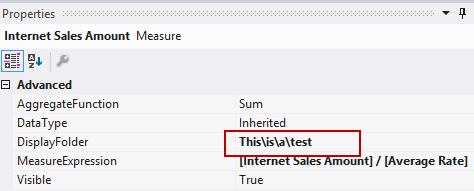
On the same day, I also found out it’s possible to nest display folders in SSAS. Which was even better, because I have a project with dozens of measures and this functionality really makes the difference. All you have to do is putting backslashes to indicate where a new child folder begins:
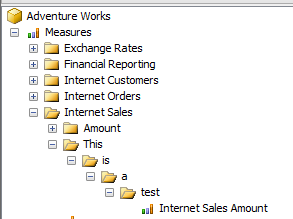
And voila:
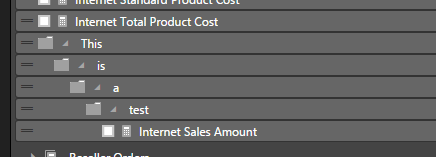
It even works in Power BI Desktop (make sure you have the latest update):
Time for a happy dance!
You can find the slides and SQL scripts for my session "Spice up your SQL…
The slides for my session "The €100 data warehouse on the Azure data platform" can…
A good week ago I hosted the monthly T-SQL Tuesday blog party. I invited the…
It's the second tuesday of the month, which means T-SQL Tuesday time! This month's topic…
It's time for T-SQL Tuesday again! And we're almost to number 200! T-SQL Tuesday is…
A while ago we suddenly had an error while trying to deploy one Fabric workspace…