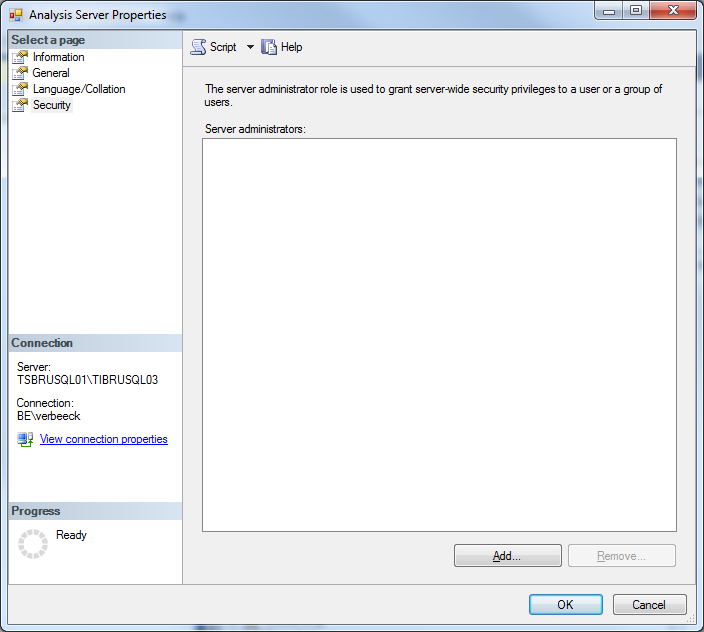
I was almost 100% certain I added myself as an administrator during SQL Server set-up and the configuration of the Tabular server. I logged in the server, went to properties and then to security. The list of server administrators was as empty as a merchant’s soul (yep, I googled that one). I either forgot to add myself as an admin (not likely, because according to the docs the set-up doesn’t continue if you don’t select an admin), or something fishy was going on.
So I tried to add myself as an administrator, however no dice: I didn’t have the correct permissions. A quick search engine search (sorry) revealed I should be able to, because local administrators do have admin permissions in SSAS Tabular. This was starting to get annoying.
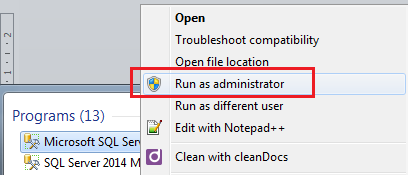
However, a bit more thorough search showed me the solution: you had to launch SSMS as an administrator. Good old UAC, you strike again, old foe.
And lo and behold, I could add myself as an admin! Which means I don’t have to run SSDT as an admin every time I want to create a new Tabular project.
You can find the slides and SQL scripts for my session "Spice up your SQL…
The slides for my session "The €100 data warehouse on the Azure data platform" can…
A good week ago I hosted the monthly T-SQL Tuesday blog party. I invited the…
It's the second tuesday of the month, which means T-SQL Tuesday time! This month's topic…
It's time for T-SQL Tuesday again! And we're almost to number 200! T-SQL Tuesday is…
A while ago we suddenly had an error while trying to deploy one Fabric workspace…

View Comments
Thanks a ton.. works perfectly
Thanks!